
NDIS provider · QuickBooks Online
How SureSafe took the manual work out of matching NDIS payments
SureSafe's plan managers each send remittances in their own format. RemitClear reads them, matches the invoices and posts the payments to QuickBooks, with the bookkeeper checking the handful that need attention.
By RemitClear ·
Just over 1,500
remittances handled
526
different payers
No templates or rules
to build for each payer
July to early September 2026.
Matching payments by hand
SureSafe is an NDIS-registered provider paid by hundreds of different plan managers, each sending its own remittance format. General Manager Daniel Lamb was matching those payments by hand before passing the work to a bookkeeper. He described it as the worst job in the month.
Before RemitClear
- Remittances arrive in different formats
- Payments matched by hand
With RemitClear
- RemitClear matches and posts the payments
- Bookkeeper checks the discrepancies
From the inbox into QuickBooks
SureSafe connected RemitClear to QuickBooks in July 2026. Remittances now arrive by email, get read and matched to open invoices, and post to QuickBooks. The team didn't have to build a template or rule for each plan manager's format.
The bookkeeper checks the handful with a discrepancy. The remittance and matched invoices sit side by side, making it easy to see where a payment differs from the amount due.
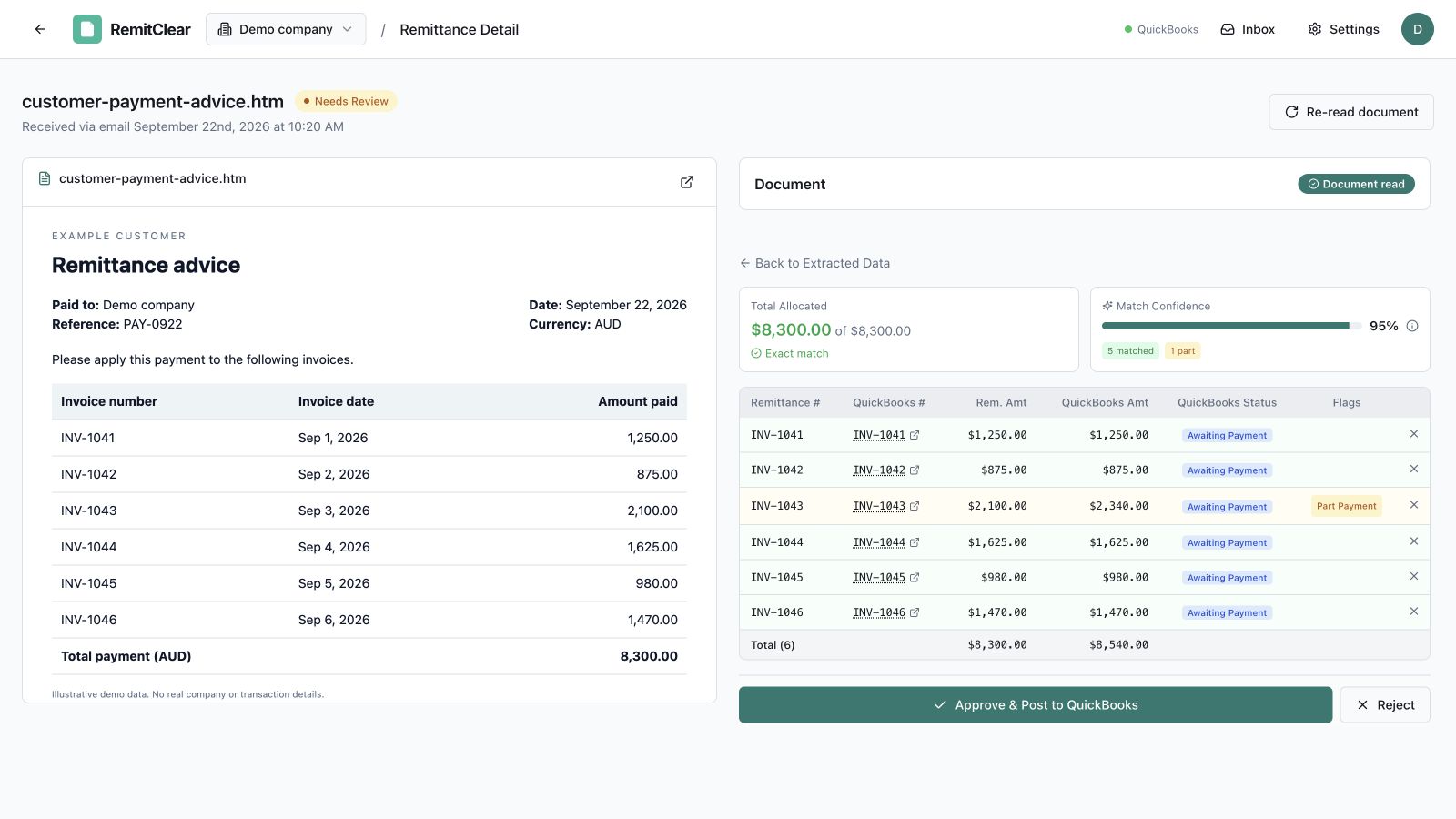
Over 1,500 remittances, with little manual work
By early September, RemitClear had handled just over 1,500 remittances from 526 different payers. Almost none of that processing needed a person, so the bookkeeper could focus on the payments that needed checking.
Once the payments are posted, the team confirms the matching bank transaction in QuickBooks.
“We didn't build a template or a rule for a single one of them.”
See how it fits your team's work
Bring a few remittances from your plan managers. We'll match them to your QuickBooks invoices so you can see how much work it takes off your bookkeeper's hands.
