Free Remittance Advice Template
A remittance advice is a note the payer sends the payee to say which invoices a payment covers, how much went against each one, and how the payment will appear on the bank statement.
An editable Word template, a self-calculating Excel version, a filled-in example and an online generator. For the payments your accounting software's built-in advice can't cover, and for sending to your own customers as the format you'd like to receive.
Free download
The remittance advice template pack
An Excel template that totals itself and flags when the invoice lines don't add up to the amount you actually paid, a letterhead-style Word version, and the completed example as a PDF. For the payments that don't fit the fixed advice your accounting software prints, or to share with your customers as the format you'd like to receive.
- Excel template (.xlsx)Totals calculate themselves and a check cell compares them against the amount you actually paid. Includes a filled-in example tab.
- Word template (.docx)Letterhead-style version; add your own logo and branding
- Filled-in example (.pdf)The completed advice as a PDF, ready to share with customers as the format you'd like to receive
- Open in Google Sheets (makes your own copy)The Excel template as a Google Sheet, copied into your own Drive
What a remittance advice contains
The payer, payment date, payment reference and bank account describe the payment itself. The invoice fields repeat once for every invoice the payment covers, and the total at the end has to match the amount that left the bank.
- Payer
- Who's making the payment, with a contact for anyone who needs to query it.
- Payment date
- The date the money left the payer's bank, which is the date the payee reconciles against.
- Payment reference
- The text that will show against the deposit on the bank statement, so the advice and the bank line tie together.
- Bank account
- The account the money was sent to, usually the last few digits, so the payee knows where to look.
- Invoice number
- One row per invoice, with the number exactly as the supplier issued it, prefix included.
- Invoice date
- The date on the invoice being paid. It separates two invoices with similar numbers or identical amounts.
- Gross amount
- The full invoice amount, before anything is taken off it.
- Deduction or discount
- Anything withheld from that invoice, in its own column with the reason, rather than netted off the gross.
- Net paid
- The gross less the deduction, which is the amount actually going against that invoice.
- Total paid
- The net paid column added up. It has to equal the amount that left the bank, or the advice creates work instead of removing it.
Remittance advice example
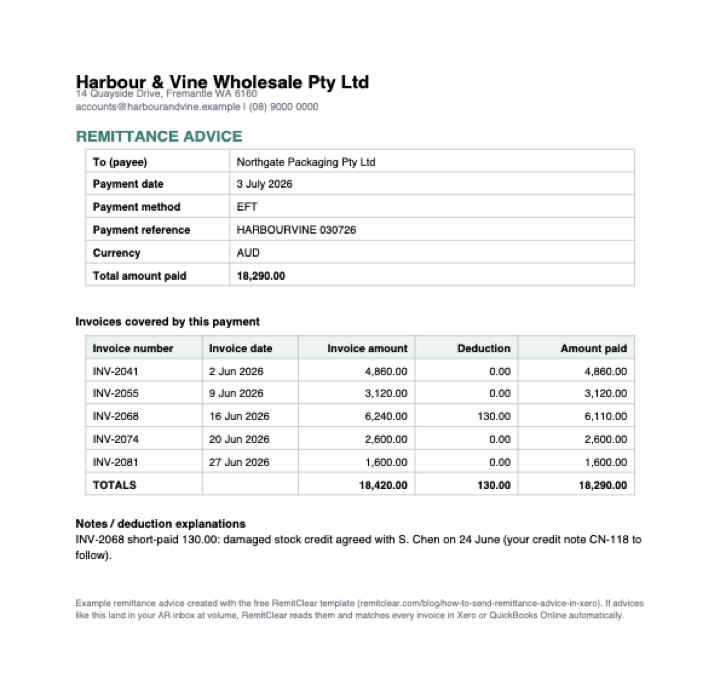
This sample is the same document as the filled-in PDF in the pack: one EFT payment covering 5 invoices, with one of them short-paid and the reason given on the advice.
| To | Northgate Packaging Pty Ltd |
|---|---|
| Payment date | 3 July 2026 |
| Payment method | EFT |
| Payment reference | HARBOURVINE 030726 |
| Currency | AUD |
| Total amount paid | 18,290.00 |
| Invoice number | Invoice date | PO / reference | Invoice amount | Deduction | Amount paid |
|---|---|---|---|---|---|
| INV-2041 | 2 Jun 2026 | PO-88231 | 4,860.00 | 0.00 | 4,860.00 |
| INV-2055 | 9 Jun 2026 | PO-88407 | 3,120.00 | 0.00 | 3,120.00 |
| INV-2068 | 16 Jun 2026 | PO-88512 | 6,240.00 | 130.00 | 6,110.00 |
| INV-2074 | 20 Jun 2026 | PO-88598 | 2,600.00 | 0.00 | 2,600.00 |
| INV-2081 | 27 Jun 2026 | PO-88640 | 1,600.00 | 0.00 | 1,600.00 |
| Totals | 18,420.00 | 130.00 | 18,290.00 | ||
Notes: INV-2068 short-paid 130.00: damaged stock credit agreed with S. Chen on 24 June (your credit note CN-118 to follow).
The reference matches the bank statement.
HARBOURVINE 030726 is the text Northgate Packaging Pty Ltd will see against the deposit, so the advice and the bank line tie together without a phone call.
One row per invoice.
5 invoices, 5 rows, each with the number exactly as it was issued and the PO alongside it as a fallback if a number is mistyped.
The deduction has its own column and its own note.
INV-2068 shows 6,240.00 invoiced, 130.00 deducted and 6,110.00 paid, and the notes line says why and who agreed it, rather than a silently netted 6,110.00.
The totals tie to the amount paid.
The amount-paid column adds up to 18,290.00, the figure that actually left the bank, so the payee can reconcile the whole deposit from this one page.
When you need a template instead of your accounting software's own advice
Xero, QuickBooks Online, Sage and MYOB can each print or email a remittance advice from a recorded bill payment, with a fixed layout, and for most supplier payments that's all you need. In Xero the send lives on the payment record, under Options and then Send Remittance Advice, with a Send Remittance button on batch payments: see how to send a remittance advice in Xero. In QuickBooks Online it's the Send remittance action on a recorded bill payment, or automatic when you pay through QuickBooks Bill Pay: see how to send a remittance advice in QuickBooks Online. A separate template earns its place in three situations the built-in advice doesn't handle.
- Payments made outside the ledger. An ACH, BACS or EFT run paid straight from the bank, or a wire, has no bill payment record to generate an advice from. Whether you call it an ACH remittance advice, a BACS remittance advice or an EFT remittance advice, it's the same document with a different payment method field, and this template lets you produce it independently the moment the money moves.
- Information the fixed fields can't show. Deduction explanations, purchase order references, or a covering note that a supplier's portal requires.
- A document you fully control. When you want to set out the payment your way, keep a consistent house format across every payment run, or put your own branding on a PDF.
The rules that make a remittance reconcile first time
A remittance advice only helps if the person receiving it can match it to their invoices without guesswork. The template is built around six rules, and they are worth following whether you use it or not.
- One row per invoice. Never combine invoices into a single line.
- Exact invoice numbers. Include any prefix (for example INV-, RC-) exactly as the supplier issued it.
- A PO or reference alongside it. Where the supplier quotes a purchase order or your own reference, put it in its own column. It is the most useful fallback when an invoice number is mistyped or missing.
- Deductions in their own column. Show short payments and rebates separately, never silently netted off the invoice amount.
- A matching payment reference. Use the reference exactly as it will appear on the bank statement, so the deposit and the advice can be tied together.
- Totals that add up. The amount-paid column must equal the amount that actually left the bank. If it does not, the advice creates work instead of removing it, which is why the Excel version checks the two against each other.
How to fill in each version
Excel version (recommended)
Type the total amount paid at the top, then one invoice per row across 25 lines. The amount-paid column and the totals calculate themselves, and a check cell compares the invoice lines against the total that actually left the bank, telling you how much you are out by before you send. A second tab shows a filled-in worked example, including how to explain a deduction. When you are done, print or save as PDF and send the PDF.
Google Sheets
The same self-checking sheet as the Excel version, for teams that live in Google Workspace. Opening the link makes your own copy in your Drive, so you can fill it in straight away and download the finished advice as a PDF from the File menu.
Word version
A letterhead-style layout for when you want your logo and branding on the advice, or when a payment covers only one or two invoices and reads more like a letter than a table. Word does not add the columns up for you, so check the amount-paid total against the payment yourself, then export to PDF before sending.
Send it as a PDF
Whichever version you use, send the finished advice as a PDF. Suppliers should receive a fixed document they cannot accidentally alter, and a PDF renders the same on every device. Keep the editable file for your own records and reuse it next time. If you'd rather skip the spreadsheet altogether, the online generator builds the same layout in your browser and downloads it as a PDF.
Remittance advice email template
The advice itself usually travels as an attachment, so the email body is what gets read on a phone, and it's what decides whether the payment gets matched today or after a reply asking which invoices it covers.
Remittance advice: [Your company] payment [reference] on [date]
Hi [name],

Please find our remittance advice attached for the payment of [currency] [total] sent by [EFT/BACS/ACH] on [date], reference [reference].

It covers [n] invoices: [INV-1, INV-2, INV-3]. [INV-2 is short-paid by [amount], see the note on the advice.]

The payment will show on your bank statement as [reference].

Thanks,
[Name], [Company], [email]
- Attach the advice as a PDF, not the editable Word or Excel file.
- Single invoice? Put the invoice number in the subject line instead of the payment reference.
On the receiving end of messy remittances?
If you are the one being paid, share this template with customers who send hard-to-read advices, as the format you would like to receive. The same rules that make an advice easy for a person to reconcile also make it easier to match automatically.
At volume, even clean remittances are a lot of manual matching. RemitClear reads every incoming remittance, in any format, and matches each line to your open invoices in Xero or QuickBooks Online. See Xero remittance matching or cash application for QuickBooks Online for how that works, or the step-by-step of doing it by hand in how to reconcile a remittance advice in Xero and applying one payment to multiple invoices in QuickBooks Online.
Frequently asked questions
Is there a free remittance advice template for QuickBooks or Xero?
Yes. This page has a free remittance advice template pack that works alongside any accounting system: an editable Word version, an Excel version that totals itself and checks those totals against the amount you actually paid, a filled-in example, and an online generator that produces a PDF in your browser. Xero and QuickBooks Online can each generate a remittance advice from a recorded bill payment, but the layout is fixed and the advice only exists once the payment is entered in the ledger. The template covers the cases the built-in advice can't, such as payments made straight from the bank, and gives you a document you fully control.
Can I customise the remittance advice my accounting software produces?
Only partly, in each of them. Xero prints the advice on your standard invoice branding theme (logo, name, address, colours) and lets you save a reusable covering message, but the body fields (payment date, amount, bills covered, references, total) are fixed and the advanced DOCX invoice templates do not apply to remittances. In QuickBooks Online, custom form styles cover sales forms only, so a bill payment remittance prints with your company name and the fixed fields QuickBooks holds. When you need a different layout or extra information such as deduction explanations or PO references, an editable template like this one is the practical route.
What should a remittance advice include?
The payer and payee, the payment date, the payment method, the total amount paid, and a payment reference that matches how the transfer will appear on the bank statement. Then one row per invoice showing the invoice number, the PO or your own reference where the supplier quotes one, the invoice amount, any deduction, and the amount paid, with the rows totalling to the amount paid. Any deduction or short payment should be explained in a notes line against the invoice it applies to.
Is it spelled remittance advice or remitance advice?
Remittance is the correct spelling, with two ts. Remitance with one t is one of the most common typos in accounts payable, and it turns up in email subject lines, file names and supplier portals, but it means exactly the same document: the note telling the payee which invoices a payment covers and what will appear on their bank statement. If you're hunting through an inbox for an old advice it's worth searching both spellings, because whoever sent it may have typed it either way.
Can I use this remittance advice template for ACH, BACS or EFT payments?
Yes. The template records what a payment covers rather than how the money moved, and the payment method field takes ACH, BACS, EFT or wire. Whichever rail the money moved on, the rest of the template works the same way: one row per invoice, the deduction column, and the totals. Fill in the payment reference exactly as it will appear on the bank statement, because that is what lets the payee tie the deposit back to the advice. US payers usually call the document an ACH remittance advice, UK payers a BACS remittance advice, and Australian payers an EFT remittance advice. It is the same document, and the same rules apply to filling it in.
How do I fill in the Excel remittance template?
Type the total amount paid at the top, the figure that actually left the bank, then enter one invoice per row. The amount-paid column and the totals calculate themselves, and a check cell compares the invoice lines against that total, so if you are out by 130.00 it says so, and by how much, before you send. There is room for 25 invoice lines, and a second tab shows a filled-in worked example including how to explain a deduction. When you are done, print or save as PDF and send the PDF, not the editable file.
Should I send the remittance advice as a Word, Excel, or PDF file?
Fill it in using the Word or Excel template, then send it as a PDF. Suppliers should receive a fixed document they cannot accidentally alter, and a PDF renders the same on every device. Keep the editable file for your own records so you can reuse it for the next payment run.
Is there an online remittance advice generator?
Yes. The remittance advice generator at remitclear.com/remittance-advice-generator fills in the same layout as the template in your browser: type the payment details and one invoice per row, it checks the lines against the amount paid, and you download the finished advice as a PDF. There is no sign-up and nothing is uploaded, the document is built on your own device.
What should the email say when I send a remittance advice?
Keep it short, because the advice itself is the attachment and the email is what gets read on a phone. Put your company name, the payment reference and the date in the subject line. In the body, give the amount, the payment method and date, and the reference, then list the invoice numbers it covers and flag any short payment with a pointer to the note on the advice. Say how the payment will appear on their bank statement and sign off with a name and a contact email. Attach the advice as a PDF rather than the editable file, and if the payment is for a single invoice put the invoice number in the subject line instead of the reference. The email template on this page has the wording ready to copy.
Can I ask my customers to use this template when they pay me?
Yes, and it is one of the best uses of it. If your customers send you messy remittances, share this template as the format you would like to receive. One row per invoice, exact invoice numbers, a PO or reference alongside them, deductions in their own column, and a reference that ties to the bank transfer: every rule that makes an advice easy for a person to reconcile also makes it easier to match automatically.
Receiving remittances at volume?
See remittance matching in action
We can use example remittances, or yours if you'd like.

